
What Does JSP Mean?
JSP mean Jakarta Server Pages in Java web development. It helps developers create dynamic web pages using Java. The server processes the page before sending it to the browser.
Many students see JSP mean and feel confused at first. The name sounds technical and complex. Learning its meaning makes Java web topics much easier.
JSP mean plays an important role in Java applications. It works with servlets to show data on web pages. Many companies still use it in real projects.
What Does JSP Mean in Java?
To understand what does JSP mean, it helps to break the term down. JSP, or Jakarta Server Pages, describes a JSP Java web technology that mixes HTML with special Java-based instructions. These instructions run on the server before the page reaches the browser. Once processed, the browser only sees normal HTML, not Java code. That separation keeps logic secure and performance predictable.
In practical terms, JSP supports JSP web application development by acting as the view layer. Developers write pages using the file extension, usually , and include JSP syntax such as expressions and tags. This design lets teams build pages that respond to user input, database results, and session data without relying on client-side scripting alone.
How JSP Works Behind the Scenes
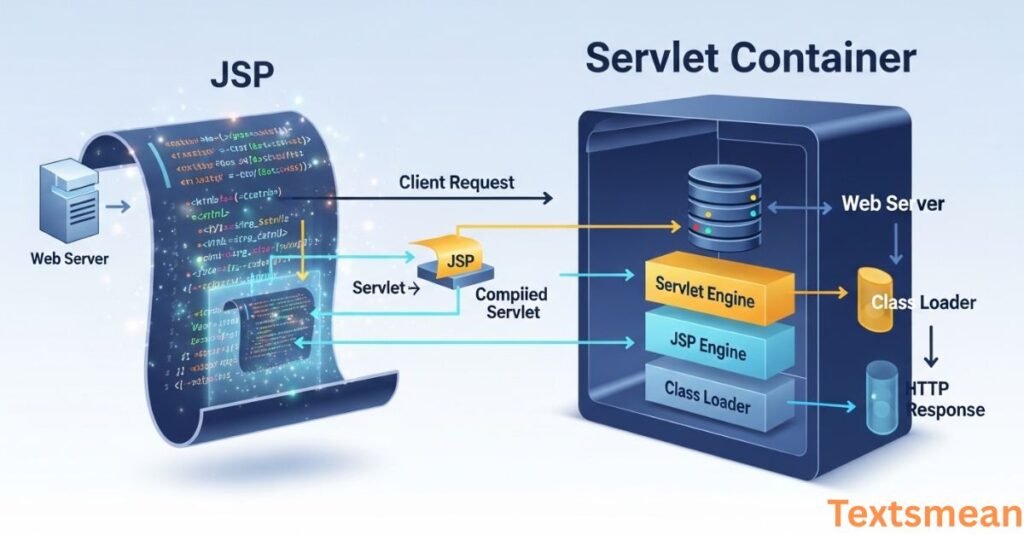
When a user requests a page, the JSP page rendering process begins inside a servlet container. The server translates the file into a servlet that follows the Java servlet specification. This servlet then compiles and runs like any other Java class. The result is HTML sent back to the browser, completing the request response lifecycle.
This flow highlights why backend integration feels seamless. JSP connects directly to Java objects, services, and databases, enabling server-side Java rendering. Unlike static pages, reacts to user actions in real time, which makes it ideal for forms, dashboards, and data-driven interfaces.
Is JSP Frontend or Backend?
JSP sits between the frontend and backend. It handles presentation like HTML but executes logic on the server, making it a form of JSP server-side scripting. Developers often describe it as a bridge that turns backend Java data into visible web pages.
JSP in Jakarta EE
JSP in Jakarta EE reflects the evolution of Java enterprise standards. After Java EE moved to the Eclipse Foundation, JSP became part of Jakarta EE alongside servlets and other APIs. This shift ensured continued updates, compatibility, and long-term support for businesses relying on JSP.
Within Jakarta EE, JSP works alongside APIs that support enterprise Java applications. It integrates with security, persistence, and messaging services, which makes it suitable for large systems that demand reliability. Even as frameworks evolve, JSP remains a recognized standard within the Jakarta ecosystem.
Read Also: IGL Meaning in Text: A Complete and Easy Guide to This Popular Gaming Term
JSP and Servlets Explained Simply
The relationship between JSP and servlets defines JSP and servlets integration. Servlets handle requests, process data, and control application flow, while JSP focuses on displaying results. This division supports the JSP MVC architecture, where servlets act as controllers and JSP pages act as views.
Comparing JSP vs servlets shows why they work best together. Writing HTML inside servlets quickly becomes messy, while placing heavy logic inside JSP breaks clean design. Combining both keeps code readable and easier to maintain within a Java MVC framework.
JSP and JSF
JSF vs JSP often confuses beginners. JSP came first and focuses on page templates, while JSF provides a full component-based framework. Over time, JSF adopted Facelets view technology, which replaced JSP in modern JSF projects.
That said, older systems still use JSP with JSF, especially in JSP legacy applications. Understanding both helps developers maintain existing software while transitioning to newer tools when needed.
Do Developers Still Use JSP?
Yes, JSP modern usage still exists, especially in corporate environments. Many organizations rely on JSP legacy applications that handle payroll, inventory, and internal reporting. Rewriting these systems rarely makes financial sense when JSP already works reliably.
In the U.S. job market, developers still encounter JSP in maintenance roles, migrations, and hybrid systems. Knowing JSP improves versatility, particularly when working with Java web development teams that manage long-lived platforms.
Is JSP Outdated or Still Useful?
JSP is not trendy, but it remains useful. It shines in stable systems where change introduces risk. For simple server-rendered pages, JSP still performs well and integrates easily with Java backends.
Learn JSP and the Jakarta Standard Tag Library
JSP and JSTL usage improves readability and security. JSTL, or Jakarta Standard Tag Library, provides ready-made tags that replace raw Java code in pages. Developers rely on JSTL core tags and JSTL functions to loop over data, format values, and escape output safely.
By using JSP tag libraries, teams reduce errors and protect against injection attacks. JSTL works seamlessly with Expression Language EL, allowing cleaner expressions that access data without verbose syntax.
Writing JSP Pages
Writing JSP pages starts with HTML and adds dynamic behavior through JSP expression language, JSP tags, and JSP implicit objects. These objects provide access to requests, sessions, and application data without manual setup. This simplicity accelerates JSP web application development.
A typical JSP page runs inside a JSP servlet container such as Apache Tomcat. Developers often deploy JSP applications using Apache Tomcat JSP, which handles compilation, execution, and lifecycle management automatically.
A Simple JSP Example Explained
A basic JSP page may display user input by reading request parameters through Expression Language EL, then sending formatted output back to the browser. This approach demonstrates how JSP syntax transforms raw data into user-friendly pages.
JSP vs Modern Alternatives
Modern tools like Thymeleaf, React, and Vue emphasize client-side rendering. However, JSP still fits projects that prefer server-side Java rendering. Teams using Spring MVC JSP continue to rely on JSP views because of their tight integration with Spring controllers.
The table below shows how JSP compares with newer options.
| Feature | JSP | Modern Frontend Frameworks |
| Rendering | Server-side | Client-side |
| Learning curve | Moderate | Often steep |
| Best for | Stable enterprise apps | Interactive user interfaces |
| Integration | Strong Java backend | API-driven |
Common JSP Use Cases
Organizations still deploy JSP for internal dashboards, admin panels, reporting tools, and educational systems. These projects benefit from JSP backend integration and predictable performance. JSP also suits systems hosted on application server vs servlet container setups, depending on scale.
Advantages and Disadvantages of JSP
JSP offers fast development, strong Java integration, and proven stability. However, it lacks the interactivity of modern frontend stacks. Choosing JSP depends on project goals, team skills, and long-term maintenance needs.
JSP in the Servlet Container
JSP always runs inside a servlet container, which acts as the engine that understands how to process JSP files. When a user requests a JSP page, the container first translates that page into a servlet. It then compiles the servlet and executes it like normal Java code. This process allows JSP to work smoothly with backend Java logic while keeping HTML output clean and browser-friendly.
The servlet container also manages important tasks such as request handling, session tracking, and resource management. Because of this setup, JSP becomes part of a controlled environment where Java web applications can scale safely. Popular servlet containers like Apache Tomcat make JSP easy to deploy, test, and maintain in real-world projects.
Servlet Container vs. Application Server
A servlet container focuses mainly on handling web requests and responses. It supports technologies like servlets, JSP, and JSTL, which are essential for building Java-based websites. Lightweight containers keep things simple, fast, and easier to manage, especially for small to medium web applications.
An application server goes further by offering a full enterprise stack. In addition to servlet features, it supports messaging, transactions, security, and database services. While large companies may need application servers, many developers prefer servlet containers because they are faster to configure and easier to run for everyday Java web development.
How to Use JSP with Tomcat
Using JSP with Tomcat starts by placing JSP files inside a web application folder. Tomcat automatically recognizes the .jsp file extension and knows how to handle it. Once the server starts, Tomcat compiles the JSP page into a servlet the first time it is accessed, then stores it for faster reuse.
Tomcat simplifies development because it requires very little setup. Developers can test changes quickly by refreshing the browser. This fast feedback loop makes Tomcat a favorite choice for learning JSP and building internal tools, demos, and production-ready Java web applications.
Read Also: WTMS Meaning in Text: A Complete Guide
Implicit Objects in JSP
Implicit objects are built-in variables that JSP provides automatically. Developers don’t need to create or configure them. These objects give direct access to request data, session data, application settings, and server context. This design saves time and reduces boilerplate code.
Because implicit objects always exist inside JSP pages, they help pages stay focused on presentation logic. Instead of writing complex Java code, developers can use simple expressions to display data. This approach keeps JSP files cleaner and easier to understand.
Request Parameters
Request parameters carry data from the browser to the server. They often come from form submissions, URL queries, or user actions. JSP can access these parameters directly through implicit objects, making it easy to read user input without extra configuration.
Handling request parameters properly allows JSP pages to respond dynamically. Pages can show personalized messages, search results, or validation errors. This interaction forms the foundation of most dynamic Java web pages and user-driven workflows.
JSP in a Web Application
In a typical Java web application, JSP acts as the view layer. Servlets or controllers handle business logic and prepare data. Once ready, they forward the request to a JSP page for display. This separation keeps applications organized and easier to maintain.
JSP fits naturally into this structure because it focuses on rendering content. It receives prepared data and turns it into HTML. This design supports clean architecture and long-term stability in enterprise Java applications.
Listing 2. JSP Code for the Implicit Objects Web Application
The example JSP code demonstrates how implicit objects work in practice. It shows how JSP expressions read request parameters and display them safely. By using expression language, the code stays short and readable.
This example also highlights how JSP pages combine HTML structure with server-side logic. Developers can inspect the source, understand the flow, and quickly adapt it for their own applications. Simple examples like this make JSP easier to learn.
JSP Functions
JSP functions provide reusable logic that developers can call inside expressions. Instead of repeating code, a function performs a specific task such as formatting text or escaping characters. This approach keeps JSP pages clean and consistent.
Functions work especially well when paired with expression language. Developers can transform data directly inside the page without breaking the visual structure. This balance between power and simplicity is one reason JSP remains practical.
The Jakarta Standard Tag Library (JSTL)
JSTL is a collection of standard tags designed to simplify JSP development. It replaces script-heavy code with readable tags that handle logic, formatting, and data access. Because JSTL is standardized, it works the same across different servlet containers.
Using JSTL improves code quality and reduces errors. It encourages best practices by keeping Java logic out of JSP pages. Many teams rely on JSTL to maintain clean and secure Java web applications.
Securing JSP Pages with JSTL
Security becomes easier when JSP uses JSTL tags instead of raw output. JSTL automatically escapes dangerous characters that could lead to script injection attacks. This protection is critical for pages that display user input.
By relying on JSTL, developers reduce the risk of common security flaws. Pages remain readable while enforcing safe output rules. This balance helps protect users without adding unnecessary complexity.
JSTL Tag Classifications
JSTL includes several categories of tags, each serving a specific purpose. Some handle logic and flow, others format data, and some work with strings or XML. This organization makes JSTL flexible and easy to learn.
Each tag group focuses on one responsibility. Developers can choose exactly what they need without cluttering pages. This modular approach supports cleaner JSP designs and better long-term maintenance.
Calling Taglibs in JSP Pages
To use JSTL or other tag libraries, a JSP page must declare them at the top. This declaration tells the servlet container which library to load and how to reference its tags. Once declared, the tags are available throughout the page.
Calling taglibs correctly allows JSP pages to stay expressive without becoming messy. Tags act like building blocks that handle common tasks. This structure improves readability and teamwork across development teams.
Layout of a JSP Web Application
A JSP web application follows a standard folder structure. Public files sit at the root, while protected configuration files stay inside the WEB-INF directory. This separation keeps sensitive resources safe from direct access.
This layout also helps servlet containers understand how to run the application. JSP pages load correctly, servlets map to URLs, and libraries remain organized. Following this structure avoids deployment issues and confusion.
JSP’s Request-Response Architecture
JSP works within a request-response cycle. A browser sends a request, the server processes it, and JSP renders the response. This flow repeats for every interaction, keeping communication predictable and controlled.
Because JSP runs on the server, it can access databases, services, and session data before responding. This design allows developers to build dynamic pages that react instantly to user input and system state.
MVC in JSP and Servlet Applications
The MVC pattern separates concerns into model, view, and controller. In JSP applications, servlets usually act as controllers, Java classes represent models, and JSP pages handle views. This separation keeps code organized and flexible.
MVC improves teamwork and scalability. Developers can change how pages look without touching business logic. Over time, this structure makes Java web applications easier to update and maintain.
Common Mistakes Beginners Make When Learning JSP
One common mistake beginners make when learning JSP is mixing too much Java code directly into JSP pages. This practice, known as scriptlets, can make code hard to read and maintain. Modern best practices encourage separating logic from presentation using frameworks or tag libraries for cleaner structure.
Another mistake is not understanding how JSP works with servlets behind the scenes. Beginners often treat JSP as standalone, ignoring the request-response lifecycle. Failing to learn concepts like MVC architecture and proper file structure can lead to confusion, making it harder to build scalable and well-organized web applications.
The Future of JSP in Modern Web Development
The future of JSP in modern web development is limited compared to newer technologies. While it still exists in legacy systems and enterprise applications, many developers now prefer frameworks like Spring Boot, React, or Angular for building dynamic and scalable applications with better flexibility and performance.
However, JSP is not completely obsolete and can still be useful for maintaining older projects or understanding Java web fundamentals. Learning JSP provides insight into how server-side rendering works. Even though its popularity has declined, it remains a foundational technology in the history of Java web development.
FAQ’S:
What does JSP mean in texting?
In texting, JSP usually means “Just Saying” or “Just Saying, Please.” People use it to soften a message or share an opinion casually.
What do you mean by JSP?
JSP is an abbreviation with different meanings depending on context. It can mean Jakarta Server Pages in tech or a casual phrase in messages.
What does JSP stand for?
JSP stands for Jakarta Server Pages. It is a Java-based technology used to build dynamic web pages.
What does JSP mean on Instagram?
On Instagram, JSP commonly means “Just Saying.” Users add it to captions or comments to clarify tone or intention.
What does lls 🕊 mean on Instagram?
“lls” means “laughing like silly” or “laughing hard,” while the 🕊 dove emoji often represents peace, love, or remembrance.
What is JSP in messages?
In messages, JSP is an informal abbreviation for “Just Saying.” The exact meaning depends on how the sender uses it.
Conclusion
JSP mean a lot in both technology and everyday language. In Java web development, JSP helps developers create dynamic web pages that change based on user actions and data. It works closely with Java servlets and runs inside a server to show correct information to users. JSP supports stable and reliable systems that many companies still use today. Learning what JSP mean gives a strong base for understanding how Java websites work. It also helps students read and understand older software projects with confidence.
Outside of programming, JSP mean something simpler in messages and social media. People use it to share thoughts in a friendly and clear way. Understanding this meaning helps students follow online conversations more easily. Both uses of JSP show how one term can serve different purposes. Knowing what JSP mean builds awareness and improves communication skills. This knowledge supports learning, growth, and better understanding of the digital world.